> For the complete documentation index, see [llms.txt](https://ladipage-vietnam.gitbook.io/v5-ladiflow/llms.txt). Markdown versions of documentation pages are available by appending `.md` to page URLs; this page is available as [Markdown](https://ladipage-vietnam.gitbook.io/v5-ladiflow/tich-hop/huong-dan-tich-hop/tich-hop-telegram.md).

# Tích hợp Telegram

### Tích hợp Telegram

Bạn cần phải tích hợp BotFather vào telegram của bạn, sau đó kết nối chưa Bot đó với **Automation** để thực hiện gửi thông báo Telegram qua Bot.

#### Thêm Father bot vào group chat của bạn

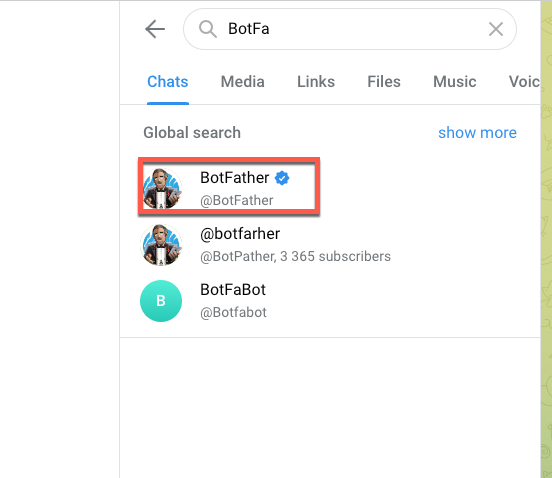
1. **Mở ứng dụng Telegram, tìm kiếm BotFather.**

<figure><img src="https://content.gitbook.com/content/MhzSb2lqVdrrRcaVOf97/blobs/zRPSrMpys2ninPdVWTxT/botfarther.png" alt=""><figcaption></figcaption></figure>

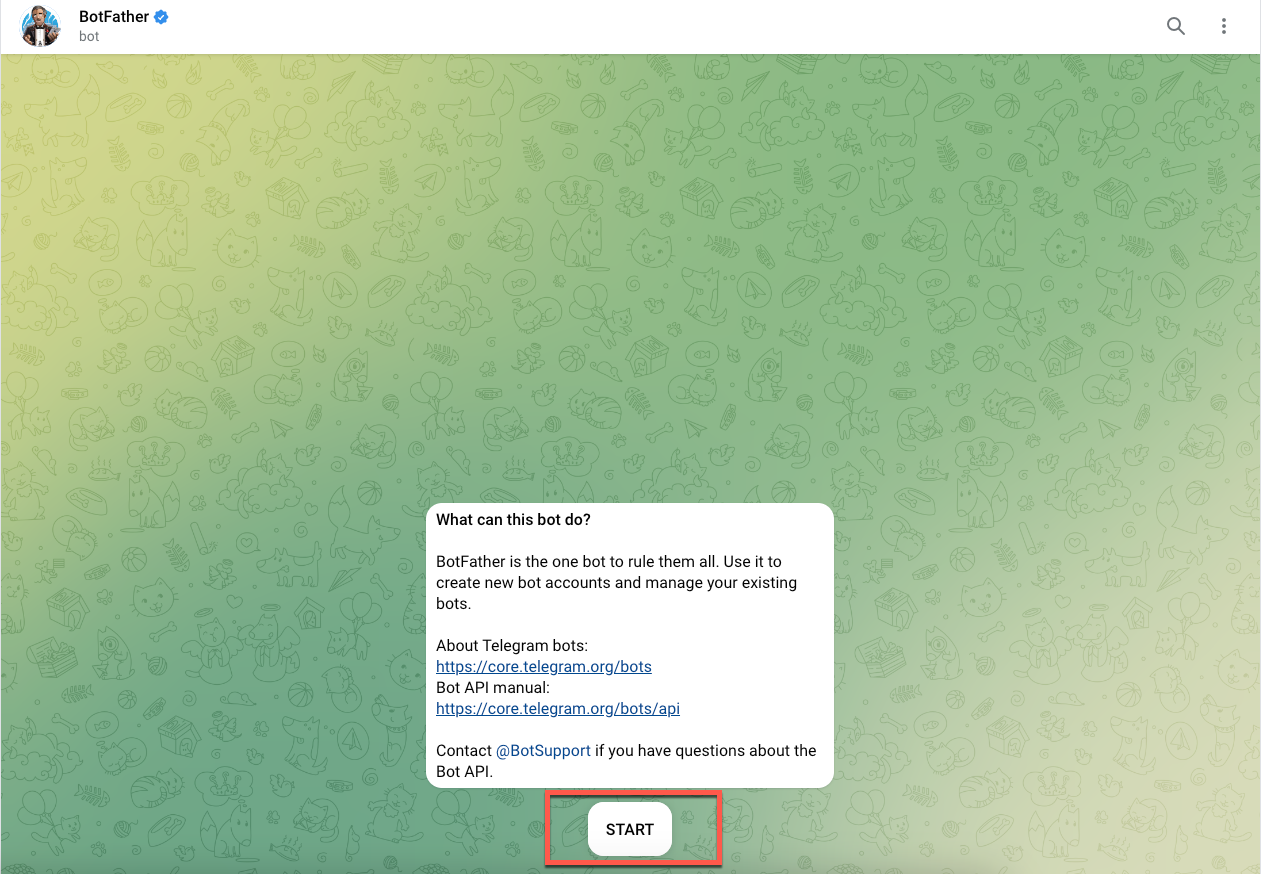
2\. **Bắt đầu cuộc trò chuyện.**

<figure><img src="https://content.gitbook.com/content/MhzSb2lqVdrrRcaVOf97/blobs/rwR01YuIacRA5F8vLrgH/ba%CC%86%CC%81t%20%C4%91a%CC%82%CC%80u.png" alt="" width="563"><figcaption></figcaption></figure>

2\. Nhập **/newbot** vào ô chat.

<figure><img src="https://lh4.googleusercontent.com/XrqCvC268A5OMAI7Mvceh9p83xtuZ5OFmuxqdSV1AjtJLElSqeZg2J2QtRHea04F9JzyWNtRpPe6hqBAj1DAjdf_inACn8uBnc31uHneS5rIFCoq2kqWpNJ_4-8FxR3QbU4800I0MHLtiQoMdaPpdAA" alt=""><figcaption></figcaption></figure>

3.**Nhập tên chat bot**. Lưu ý: tên chatbot kết thúc bằng từ “bot”.

<figure><img src="https://lh4.googleusercontent.com/21xAarUaXPJvXylnxydXVN2PPhtfr-7zIQKQLn3lVQtEirMBh00HRFYC9RU8ViuCZvIIO-9ZN4vVsHOi-_SrChZL1QwVf9QuSJ-ODwYDgIPPc7XutH8JQ0XAanmCsapjU9kHWgN9zg7EcknVYDQWnmA" alt=""><figcaption></figcaption></figure>

4. **Tạo chatbot thành công, copy token để dùng cho Access token của Automation.**

<figure><img src="https://lh3.googleusercontent.com/MWL86ID3mG2Zo4uObhrmNVloJIB9veR2YbPywjmV1-6lx2xA01sm3OEF-e288J7i9nyX41NBTOWm27z-kL7iW2cvsaBjAQ2CfXog9YamLXcglKPiDKj49OLkh7eA24ZWx9uDc9GUwYmxWhXxI8QEsQc" alt=""><figcaption></figcaption></figure>

5\. **Add chatbot vào group muốn thực hiện gửi tin.**

<figure><img src="https://lh3.googleusercontent.com/5jffRtvQGZNJwq7NNh1xj9aI6dSHnlrUjnu8N0vLyQphhzBwTHygDOo4XLmHwUKdB9hbxjdDMXquRg0RtE78bsp2b6_sUnVVUC8sLT6wKDYElzZqUicbVWe2QeGjdfeRs3M-0rjwK-PvYSpbG4W9_9A" alt=""><figcaption></figcaption></figure>

####

<figure><img src="https://lh6.googleusercontent.com/w_zhohDtbOYnEglhKhojHIJWwDcYZI8Uvo2U1n8zG1zG9DZoq8tTBNbB7ISLJlcB6m0EElAfUaE3Gyoi0N2q98SZ7IyL8lnHMir-vxEbm2adGQlXKGHeNH10isM67QafU3St36OpznkhYojdUydcfjc" alt="" width="375"><figcaption></figcaption></figure>

#### Tích hợp telegram với Automation&#x20;

1. Tìm và chọn ứng dụng Telegram.

   <figure><img src="https://1206056511-files.gitbook.io/~/files/v0/b/gitbook-x-prod.appspot.com/o/spaces%2FMhzSb2lqVdrrRcaVOf97%2Fuploads%2FheFA8GWmuyyLIajfiuLv%2Fimage.png?alt=media&amp;token=4ca3a0ff-119f-4cad-9a39-42ed942b0ca5" alt=""><figcaption></figcaption></figure>
2. Chọn Thêm liên kết.
3. Dán mã Access token vừa mới sao chép, điền tên tích hợp và lưu liên kết.

**Hiện tại hệ thống không giới hạn số tích hợp Telegram.**