> For the complete documentation index, see [llms.txt](https://ladipage-vietnam.gitbook.io/v5-ladiflow/llms.txt). Markdown versions of documentation pages are available by appending `.md` to page URLs; this page is available as [Markdown](https://ladipage-vietnam.gitbook.io/v5-ladiflow/tich-hop/huong-dan-tich-hop/tich-hop-esms.md).
# Tích hợp eSMS
eSMS là hệ thống tin nhắn SMS quảng cáo và chăm sóc khách hàng. Để sử dụng được tính năng gửi tin nhắn SMS, bạn cần đăng ký dịch vụ với eSMS trước khi tích hợp.
{% hint style="info" %}
LadiFlow chỉ hỗ trợ gửi SMS với brand name là Chăm sóc khách hàng, không nhận brand name quảng cáo.
{% endhint %}
Sau khi có tài khoản và đã đăng ký dịch vụ với eSMS, bạn thực hiện các thao tác sau để tích hợp:
1. Tìm và chọn ứng dụng eSMS
2. Chọn **Thêm liên kết.**
3. Điền Tên tích hợp
4. Mở 1 cửa sổ mới, truy cập vào eSMS ([https://esms.vn](https://esms.vn/)) đăng nhập với tài khoản của bạn.
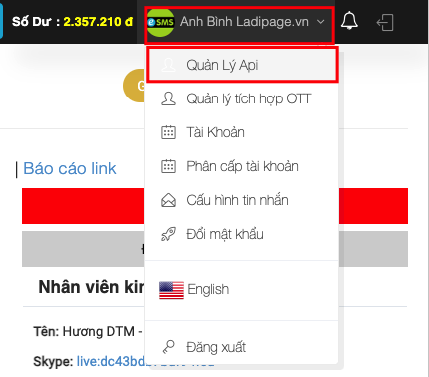
5. Tại trang eSMS, chọn **Quản lý Api** như hình dưới đây:
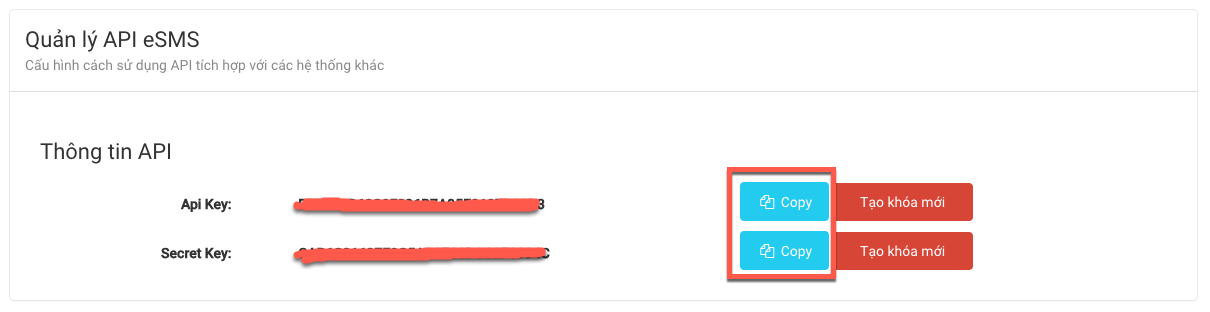
5. Sao chép lần lượt **Api Key và Secrete Key** dán vào form Thiết lập liên kết trên LadiFlow.
6. Nhập brand name bạn đã đăng ký với eSMS. Nếu sai brand name, Automationsẽ không thể gửi tin nhắn SMS.
7. Nhập số điện thoại để kiểm tra tính năng gửi tin SMS. Nếu chưa nhận được tin nhắn, bạn hãy kiểm tra lại các thông tin dữ liệu.
8. Chọn **Lưu liên kết**.
{% hint style="info" %}
**Hiện tại hệ thống không giới hạn số tích hợp eSMS.**
{% endhint %}